

How to Watch IPTV on Two TVs at the Same Time
Watching the match in the living room while someone else watches a film in the bedroom is easy with IPTV, as long as your plan has enough connections. Unlike cable and satellite, where every extra room usually means another box and another fee (see IPTV vs cable and satellite), IPTV simply needs one connection per screen. This guide explains how multi screen IPTV works, how much internet speed you need, and how to set up every TV in a few minutes.
Quick answer: choose a 2 or 3 device plan, install a player on each TV, and sign in with the details for each connection. Most fibre and cable broadband handles two screens easily.
Why you need a multi screen plan
Each IPTV login allows a set number of streams at the same time. A standard plan covers one screen. If two devices try to play at once on a one screen login, one of them will stop or show an error, often a connection limit message such as code 458 in some players. Adding connections lets each TV play independently, on different channels, without interrupting each other.
| Plan | Screens at the same time | Best for |
|---|---|---|
| 1 device | 1 | Single TV, or one person on different devices at different times |
| 2 devices | 2 | Couples, or a main TV plus a bedroom TV |
| 3 devices | 3 | Families with several TVs, phones or tablets watching at once |
How to add a second screen with Strong 8K
Add extra connections when you choose your plan: 2 devices from £18 and 3 devices from £25 a month. You get the details for each connection, and every TV, phone or tablet can use its own. See all options on the IPTV subscription page. Already a customer with a one device plan? Contact Strong 8K IPTV support and we will help you move to a multi device plan.
What internet speed you need
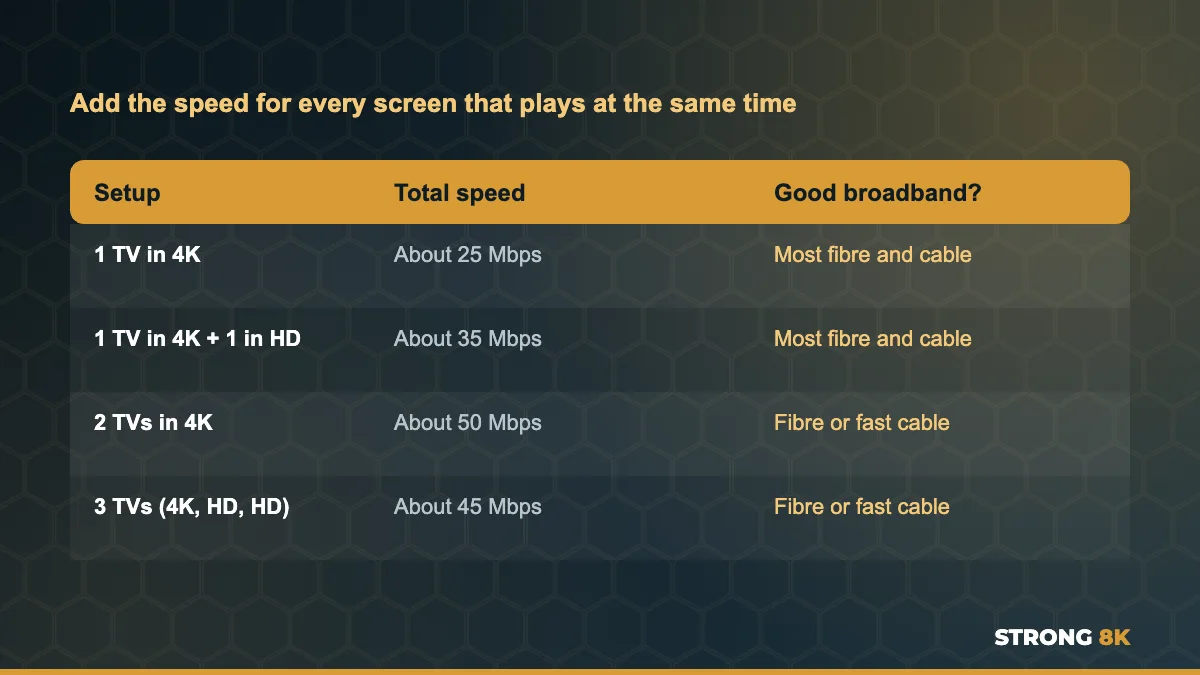
Add the speed for each screen together. Two TVs in 4K need around 50 Mbps, while one 4K TV and one HD TV need about 35 Mbps. Most fibre and cable broadband handles this easily, but remember that phones, laptops and game downloads share the same connection.
Not sure what speed your TVs actually get? Run a speed test on the TV or streaming device itself, not on your phone. Our guide on how to stop IPTV buffering explains how.
Setting up the second TV
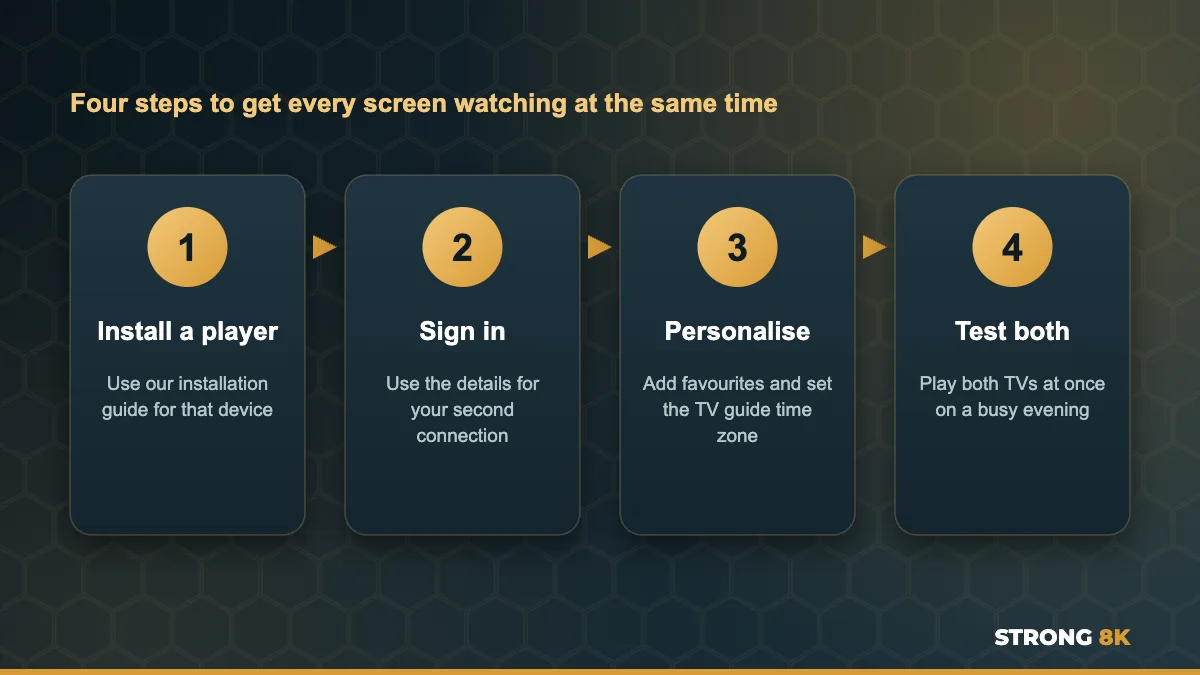
- Install an IPTV player on the second device using our Strong 8K IPTV installation guides
- Sign in with the details for your second connection, not the first one
- Pick your favourites and set the TV guide time zone
- Test both TVs at once during a busy evening
Each TV can use a different app if you prefer. For example, the Strong 8K app (8K Pro) on a Firestick in the living room and a Smart TV app in the bedroom both work with your login, and our list of the best IPTV player apps for Firestick compares other options. Follow our guides to install IPTV on Firestick, install IPTV on Samsung Smart TV or install IPTV on LG Smart TV.
Setting up a second TV? Our team can walk you through it on WhatsApp.
Get Setup HelpTips for a smooth multi room setup
- Connect the main TV with an Ethernet cable if you can
- Use a mesh Wi-Fi point for TVs far from the router
- Choose HD on the smaller screen to save bandwidth
- Close the app on devices nobody is watching, so they do not hold a connection
- Restart the router if both screens start to stutter
Common problems with two TVs
| Problem | Likely cause | Fix |
|---|---|---|
| The second TV stops when the first starts | Both TVs use the same one screen login | Use a 2 device plan and the second set of details |
| Both TVs buffer in the evening | Not enough speed for two streams | Use Ethernet on one TV or watch HD on the smaller screen |
| Error when a phone is also open | Too many devices for the plan | Close the app fully on the phone |
Want to test it first? Our 24 hour IPTV free trial lets you try the service on your main TV before you add more screens. For local broadband tips, see Strong 8K IPTV by country.
Planning a second screen? Check the internet speed you need for each TV and compare the best devices for IPTV for the extra room.
Frequently Asked Questions
Can I watch IPTV on two TVs at the same time?
Yes, with a plan that includes two connections. Each TV signs in with its own details and can watch a different channel.
Can I use one IPTV login on two TVs?
You can install it on both, but only one can play at a time on a one device plan. To watch on both at once, you need a 2 device plan.
How much internet speed do I need for two TVs?
About 50 Mbps for two 4K TVs, or about 35 Mbps for one 4K TV and one HD TV.
Can each TV use a different app?
Yes. Your Strong 8K login works in the Strong 8K app and other compatible players, so each TV can use the app that suits it.
Can I upgrade from 1 device to 2 devices later?
Yes. Message our team on WhatsApp and we will help you move to a multi device plan.