
Third Party IPTV Apps Not Working With Strong 8K? Why and What to Do
Your Strong 8K login works in one app, but another player shows an error, asks for a fee, or simply will not load the channels. With dozens of IPTV players available, from IBO Player and VU Player to TiviMate and Smarters, this is one of the most common questions our team answers. The short version: Strong 8K works with any player that supports standard IPTV logins, but each player is made by a different company, with its own login format, fees, updates and servers. When a third party app fails, the cause is usually inside that app, not your subscription.
Quick answer: check the app uses the right login type for your details, that it is an up to date official copy, and whether it needs its own activation. Then test the same login in the free Strong 8K app. If it works there, your account is fine and the other app is the problem.
Why Some Apps Work and Others Do Not
| Reason | What you notice | What to do |
|---|---|---|
| Wrong login type | Login failed, or the app asks for details you do not have | Match the login type (below) |
| App needs its own activation | Trial expired, or activate on the website | Pay the app maker, or switch app |
| Old or unofficial copy | Crashes, errors after a device update | Install the current official version |
| App maker servers down | Playlist will not load on a MAC address app | Wait, or use another app meanwhile |
| Screen limit reached | Error when another device is watching | Close the app on other devices |
| Device not supported well | Black screen, missing features | Use a different player for that device |
1. Match the Login Type
IPTV apps sign in in four main ways. Putting the right details into the wrong kind of login screen always fails, so check which one your app uses.
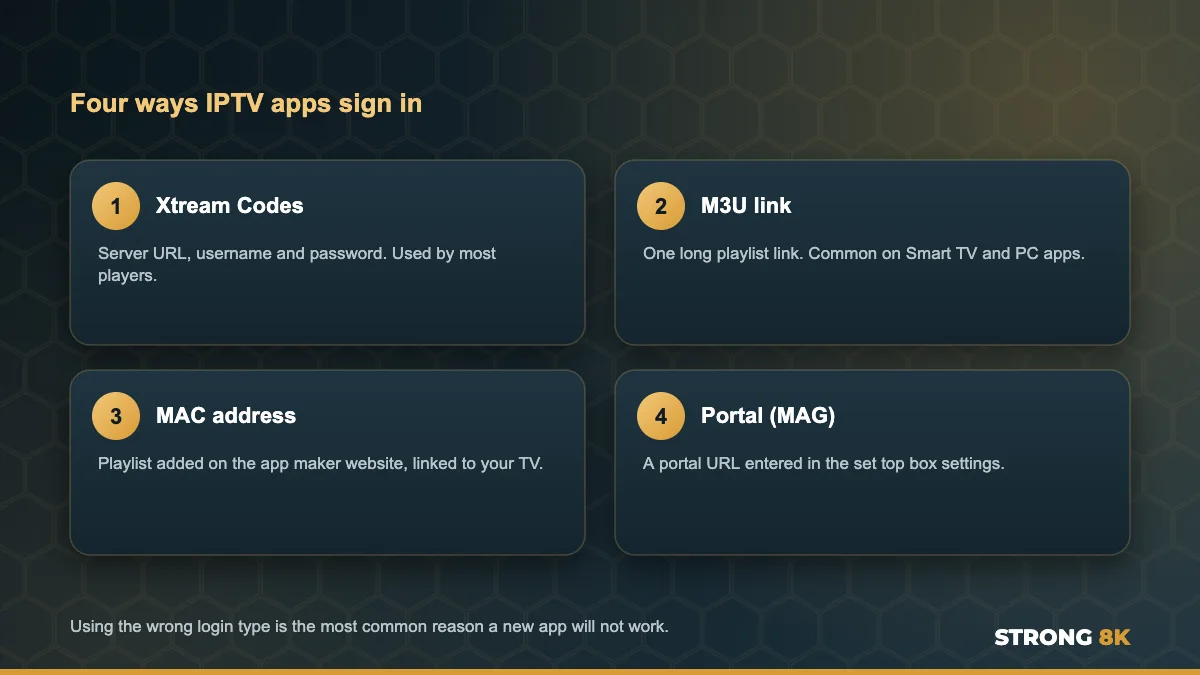
For most players, Xtream Codes is the easiest and loads the TV guide automatically. If your app only accepts an M3U link or a MAC address, ask our team and we will send the right details. Our guide to fix Strong 8K IPTV login failed errors explains each format.
2. Check Whether the App Charges Its Own Fee
Many Smart TV players, especially those that use a MAC address, offer a free trial and then ask for their own activation fee. When that trial ends, the app locks, even though your Strong 8K plan is still active. That fee is paid to the app maker, not to us. Our guide to the IBO Player trial period expired message explains what to do.
3. Use an Official, Up to Date Copy
Popular players are copied and repackaged, and old copies stop working after device updates. Uninstall any version you are unsure about and install the current one from the app maker or your TV app store. This is the most common fix for IPTV Smarters, which we cover in our guide to IPTV Smarters not working with Strong 8K.
4. Understand How MAC Address Apps Work
With apps like IBO Player, your playlist is stored on the app maker’s website and linked to your TV’s MAC address. That means two companies are involved every time the app opens: the app maker, and us. If the app maker’s website or server has a problem, the playlist will not load, even though Strong 8K is working perfectly.
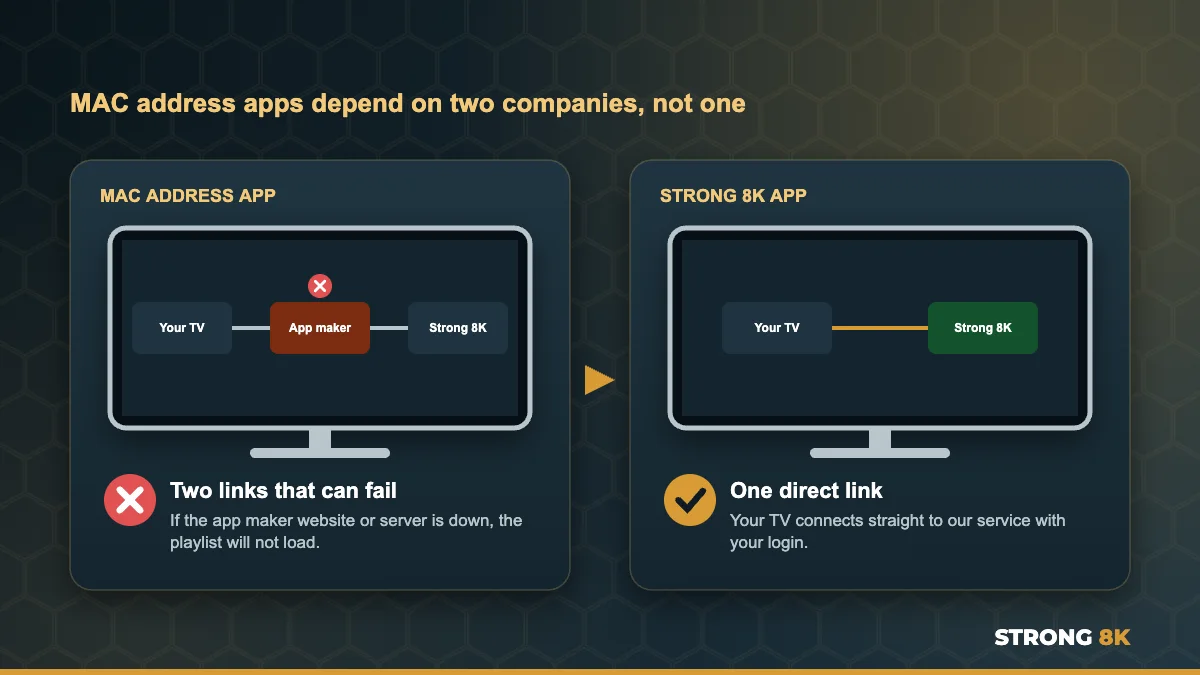
The MAC address also changes if your TV switches between Wi-Fi and a network cable, which makes a playlist seem to disappear. Our guide to a Strong 8K IPTV playlist not loading on IBO Player covers this in detail.
Not sure which details your app needs? Tell us the app name and device, and we will send the right login format for it.
Get the Right Details5. Close the App on Other Devices
Using several apps does not add screens. If your plan covers one screen and one app is still running on another device, the next app can be refused. Close every app fully on devices you are not using.
6. Test the Same Login in the Strong 8K App
This is the quickest way to know where the problem is. The free Strong 8K app (8K Pro) connects directly to our service with your login, with no activation fee, no website step and no MAC address. If your channels play there, your subscription is fine and the third party app needs attention. Many customers simply keep the Strong 8K app for this reason.
Popular Players at a Glance
| Player | Login type | Things to know |
|---|---|---|
| Strong 8K app | Strong 8K login | Free, no activation, supported by our team |
| TiviMate | Xtream Codes or M3U | Popular on Android TV and Firestick, some features paid |
| IPTV Smarters | Xtream Codes or M3U | Many versions exist, use an official copy |
| IBO Player and similar | MAC address | Own activation fee after a trial, playlist added online |
| MAG boxes | Portal URL | Needs a portal address set up for your box |
Our list of the best IPTV player apps for Firestick compares these players in more detail, and our Strong 8K IPTV installation guides show the exact setup for each device.
Want a hand setting up your favourite player? Send us the app name and your device, and our team will guide you step by step.
Chat With SupportFrequently Asked Questions
Does Strong 8K work with third party IPTV apps?
Yes. Strong 8K uses standard Xtream Codes, M3U and portal logins, so it works with any player that supports them. Some apps charge their own fees or need a specific login type.
Why does my login work in one app but not another?
Usually the second app needs a different login type, is an old or unofficial copy, or has its own activation that has expired. Your account is fine if the first app works.
Why does IBO Player or VU Player stop loading my playlist?
MAC address apps store your playlist on the app maker’s website. If their service is down, your TV MAC address changed, or the app trial ended, the playlist will not load.
Do I have to pay for IPTV player apps?
Some players are free and some charge their own activation fee. The Strong 8K app is free with your subscription.
Can I use different apps on different TVs?
Yes. Each TV can use the app that suits it, as long as the number of screens playing at once fits your plan.
Get Back to Watching
Match the login type, use an official copy, and check whether the app needs its own activation. If in doubt, test in the free Strong 8K app. For other problems, see our complete Strong 8K IPTV troubleshooting guide, or contact Strong 8K IPTV support.