
Strong 8K IPTV Playlist Not Loading on IBO Player? How to Fix It
You added your Strong 8K details to IBO Player, opened the app on your TV, and instead of channels you see “All playlists failed to load” or a loading screen that never ends. This is one of the questions our support team answers most, and the good news is that your Strong 8K subscription is almost always fine. The problem is usually in how the playlist was added to IBO Player.
Quick answer: check that the MAC address on your TV matches the one you used on the IBO Player website, delete the playlist and add it again carefully, then reload it in the app. If it still fails, restart your TV and router or test the free Strong 8K app with the same login.
How IBO Player Loads Your Playlist
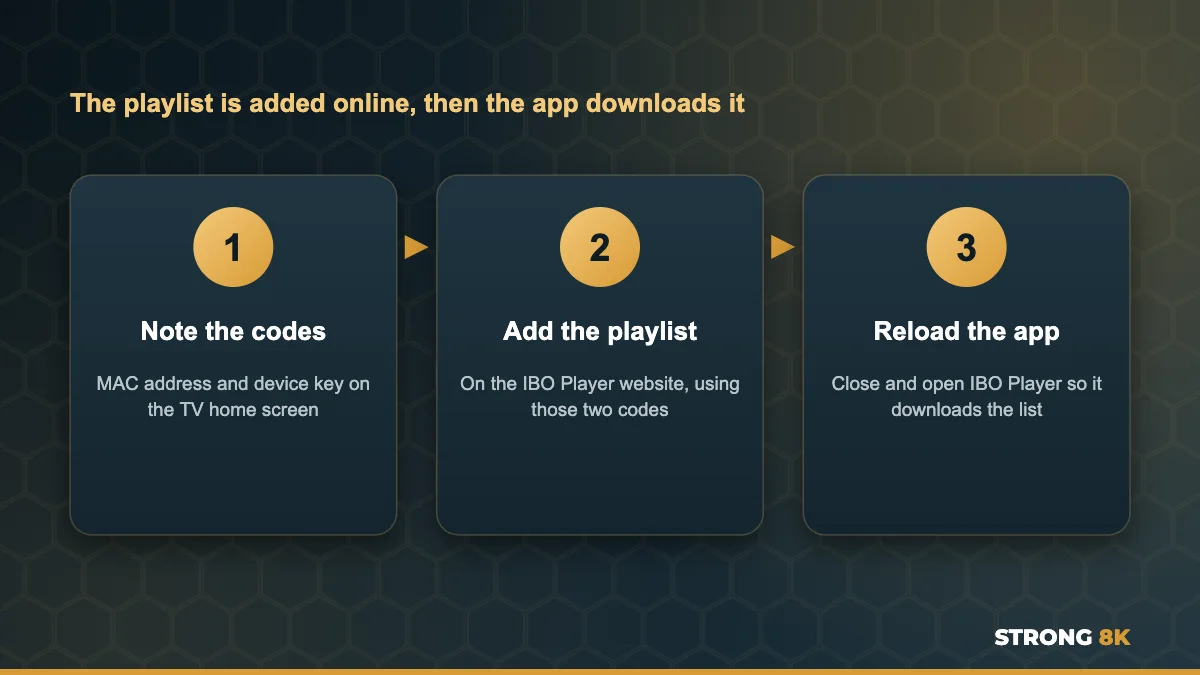
Most IPTV apps ask for your login on the TV. IBO Player works differently. The app shows a MAC address and a device key on its home screen, and you add your playlist on the IBO Player website using those two codes. The app then downloads the playlist from the website the next time it starts. That means there are three places where something can go wrong: the codes, the details you typed on the website, and the download on the TV.
Which Message Do You See?
Find the message on your screen, then go to the fix that matches it.
| Message on screen | What it usually means | Go to |
|---|---|---|
| All playlists failed to load | The playlist was added with a typo, to the wrong MAC address, or the link is broken | Fix 1 and Fix 2 |
| Current playlist is not working | The details are wrong or no longer active | Fix 2 and Fix 8 |
| No Connection! Playlist is not working | The TV cannot reach the server, often a network or DNS problem | Fix 5 and Fix 6 |
| Stuck on the loading screen | The list is still downloading, or the connection is slow | Fix 3 and Fix 5 |
| Notice: Trial Period Expired | The IBO Player app trial has ended, not your Strong 8K plan | Fix 8 |
1. Check the MAC Address Has Not Changed
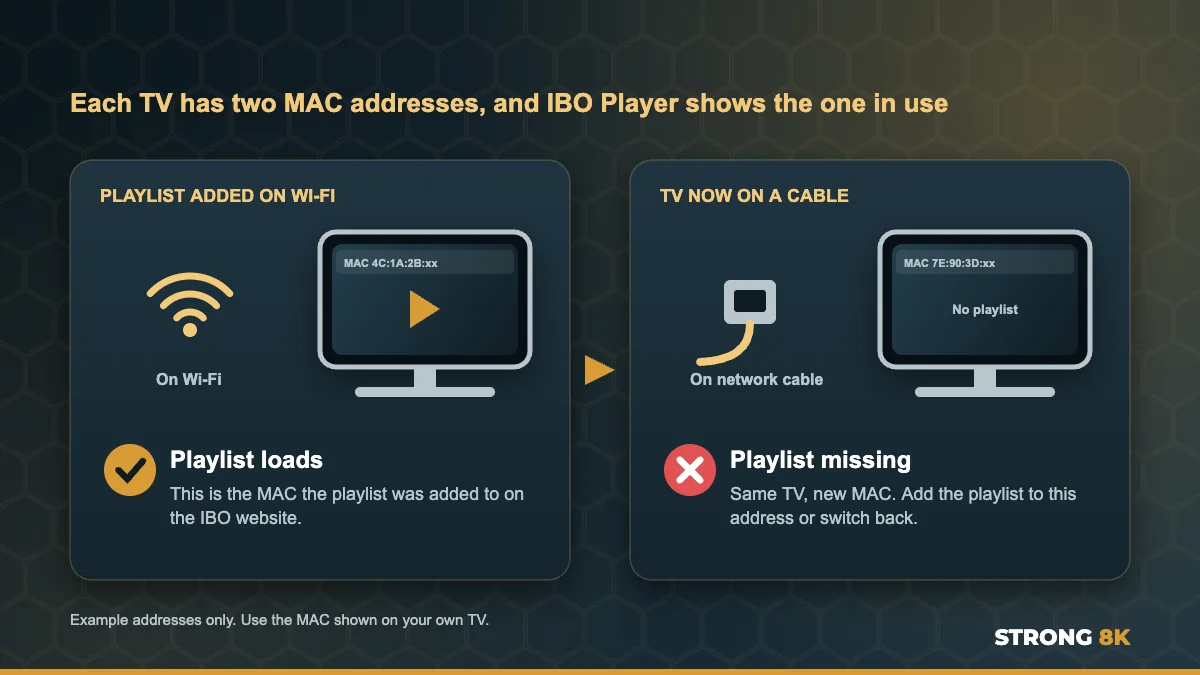
This is the cause we see most, and few guides mention it. Every Smart TV has two MAC addresses: one for Wi-Fi and one for a network cable. IBO Player shows whichever one is in use. If you added the playlist while the TV was on Wi-Fi and later plugged in a cable, or the other way round, the app shows a new MAC address with no playlist attached to it.
- Open IBO Player and write down the MAC address shown on the home screen right now
- Compare it with the MAC address you used on the IBO Player website
- If they are different, either switch the TV back to the connection you used before, or add the playlist again to the new MAC address
A MAC address is fixed to each TV and you cannot edit it, so the fix is always to match the playlist to the address the app is showing.
2. Delete the Playlist and Add It Again Carefully
A single wrong character is enough to stop the playlist loading. On the IBO Player website, sign in with your MAC address and device key, delete the old playlist and add a new one. You can add it in one of two ways:
| Playlist type | What to enter | Common mistake |
|---|---|---|
| Xtream Codes | Playlist name, server URL, username and password | Missing http:// or the port number at the end of the URL |
| M3U link | One long link that contains your details | Part of the link missing because it was copied short |
Type the server URL exactly as it appears in your Strong 8K login message, including http:// and the port, for example :8080. Usernames and passwords are case sensitive, and phone keyboards often add a space at the end. Our guide to fix Strong 8K IPTV login failed errors explains every detail to check.
Not sure what to enter? Send us your MAC address and device key and our team will tell you exactly what goes in each field.
Get Playlist Help3. Reload the Playlist in the App
IBO Player only downloads a playlist when it starts or when you ask it to. After adding or changing a playlist on the website, close the app fully and open it again. If the old list still shows, open the playlist list in the app settings (called Change Playlist on most versions), select your Strong 8K playlist again and wait a full minute for the channels, movies and series to download.
4. Remove Old or Duplicate Playlists
If you have tried a few times, the IBO Player website may now hold several copies of the same playlist, some with old or wrong details. The app can try to open one of the broken copies first. Delete every playlist on the website except one correct Strong 8K playlist, then reload the app.
5. Restart the TV and Router From the Power
Turning the TV off with the remote only puts it into standby, so the app memory is not cleared. Unplug the TV for 60 seconds, then unplug the router for 30 seconds and wait until its lights are steady before you open IBO Player again. This clears a stuck download and gives the TV a fresh connection.
6. Change DNS or Test on a Phone Hotspot
If you see “No Connection” or the playlist loads on a phone but not on the TV, your home network or internet provider may be blocking the server. Connect the TV to your phone hotspot and open IBO Player. If the playlist loads, change the DNS on your TV or router to a public DNS such as 1.1.1.1 or 8.8.8.8. Remember that switching to a hotspot can change which MAC address the TV uses, as explained in Fix 1. Our guide on Strong 8K IPTV not loading covers the hotspot test in more detail, and if the app says No Connection, follow our Strong 8K IPTV no connection fixes.
7. Try the M3U Link Instead of Xtream Codes
Some TV models handle one playlist type better than the other. If an Xtream Codes playlist keeps failing even though the details are correct, delete it and add your Strong 8K M3U link instead, or the other way round. Ask our team for your M3U link if you do not have it.
8. Check the IBO Player Activation
IBO Player is a separate app from a separate company. It gives you a free trial, then asks for its own activation fee to keep working. When the trial ends you see “Trial Period Expired” and playlists stop opening. This has nothing to do with your Strong 8K subscription, and your channels are still active. You can activate IBO Player on its website, or move to a player with no activation fee. Our guide to the IBO Player trial period expired message explains your options.
Still Not Loading? Try the Free Strong 8K App
If IBO Player keeps giving you trouble, the simplest fix is often a different player. The Strong 8K app (8K Pro) is free, has no activation fee, takes your login directly on the TV with no website step, and is fully supported by our team. Your same Strong 8K login works in it straight away. You can also compare other options in our list of the best IPTV player apps for Firestick.
Want us to set it up for you? Send your MAC address and device key and we will add your playlist to IBO Player, or help you move to the Strong 8K app.
Set It Up For MeIBO Player on Each Device
| Device | Thing to watch for | First fix to try |
|---|---|---|
| Samsung Smart TV | MAC changes between Wi-Fi and cable | Check the MAC on the home screen (Fix 1) |
| LG Smart TV | Old app version after a TV update | Update IBO Player in the LG Content Store |
| Android TV and Google TV | Full app cache | Clear the app cache, then reload the playlist |
| Firestick | Low storage stops large playlists loading | Free up storage, then reload the playlist |
| Apple TV | Playlist not refreshed after a change | Close the app fully and open it again |
Setting up from scratch? Follow our guides to install IPTV on Samsung Smart TV, install IPTV on LG Smart TV or install IPTV on Firestick. For every other error message, see our complete Strong 8K IPTV troubleshooting guide.
Frequently Asked Questions
Why does IBO Player say all playlists failed to load?
Usually the playlist was added with a typo, added to a different MAC address, or the link is no longer active. Check the MAC address, delete the playlist on the IBO Player website and add it again carefully.
Why did my IBO Player playlist disappear?
The most common reason is that the TV switched between Wi-Fi and a network cable. Each connection has its own MAC address, so the app shows a different address with no playlist. Switch back or add the playlist to the new address.
Is IBO Player Trial Period Expired about my Strong 8K subscription?
No. It is the IBO Player app trial, which is separate from your Strong 8K plan. Your channels are still active. Activate IBO Player or use the free Strong 8K app.
Should I use Xtream Codes or M3U in IBO Player?
Either works with Strong 8K. Xtream Codes is easier to type correctly. If one keeps failing on your TV, try the other.
Can Strong 8K add the playlist to IBO Player for me?
Yes. Send our team your MAC address and device key on WhatsApp and we will help you add it, or set you up on the free Strong 8K app instead.
Get Back to Watching
Most IBO Player playlist problems come down to the MAC address, a small typo or an old copy of the playlist. Fix those, reload the app, and your channels should appear. If you are still stuck, contact Strong 8K IPTV support. New to Strong 8K? Test it on your own TV first with a 24 hour IPTV free trial.